DAAAM for Photographers & Personal Archives
Find the shot without remembering the filename.
Years of RAW files, family trips, street photography, landscape shoots. You remember the light. You remember the location. You just can't find it without scrolling through thousands of unnamed folders.
Photographers accumulate fast. A decade of shooting leaves you with terabytes of folders named DSC_4872, 2019-holiday, and "misc". DAAAM reads every image and video frame and lets you search the archive the way you actually remember it, by what was in the frame.
How DAAAM solves this
Search by what's in the frame
Type "golden hour through trees, long shadow, empty road" and the shot surfaces in as soon as you finish typing. No tags, no folders, no manual scrolling.
Photos and videos in one catalogue
Your stills and video clips live in the same searchable index. Search "overcast harbour with sailboats" and find both the RAW photos and the clips from that same afternoon.
Location-based discovery
GPS from EXIF is reverse-geocoded entirely on-device. Browse every shot you've taken in Japan, or filter down to a specific city, then narrow by look or subject.
Find the near-misses and variants
DAAAM reads every frame, including the slightly underexposed backup shot. Search "overcast, wide, harbour row" and find all three versions from that afternoon side by side.
Works on the folders you already have
Point DAAAM at your existing directory tree and it indexes in place. It does not move, rename, convert, or reorganise a single file, and it never writes to your originals.
Remembers which drive it is on
Archive photographers run out of internal storage first. DAAAM keeps the catalogue searchable when the drive is unplugged and tells you which volume to reconnect for the file you just found.
Why keywording stopped working
Every catalogue tool built before 2023 assumes you will describe your own photographs. Lightroom, Bridge, Photo Mechanic, and every enterprise DAM are all built on the same bargain: label your images carefully at import, and the software will find them later. The bargain fails for the same reason every time. Keywording is work you do now for a benefit you receive years later, so it is the first thing dropped when a deadline arrives. The result is an archive with a well-tagged first fortnight and a decade of untagged everything after it.
What changes when the catalogue reads the photo
DAAAM inverts the bargain. On import it runs a vision model over every RAW file, HEIC, JPEG, and video frame and writes a description of what is actually there: the shot type, the quality and direction of the light, the subject, the setting, the mood. You did not write any of it and you do not have to maintain it. A search for "backlit portrait, harsh midday sun, brick wall" matches against that generated description rather than against a filename or a keyword you never added.
It runs on your machine, not a server
The model runs locally on Apple Silicon. Your photographs are not uploaded, not queued in someone's processing pipeline, and not used to train anything. This matters more for photographers than for most people, because an archive is rarely just your own work. It contains other people's children, clients under contract, funerals, medical documentation, and the ordinary private material of your own life. The privacy question is not whether you trust a vendor today. It is whether you want to still be trusting them in ten years when they have been acquired.
The economics of keeping an archive searchable
A subscription catalogue charges you rent on your own past work. Stop paying and you keep the files but lose the tool that makes them findable, which for a large archive is close to losing the archive. DAAAM is $69 paid once. The catalogue is a single SQLite file on your own drive that you can copy, back up, or read with any SQLite client on earth. There is nothing to renew and nothing to migrate off.
What DAAAM does not do
DAAAM is not a RAW developer. There is no exposure slider, no curves panel, no masking, no lens correction, no tethered capture, no soft proofing, and no print module. It will not replace Lightroom, Capture One, or Photo Mechanic, and it is not trying to. It sits in front of them. You find the frame in DAAAM, then open it in whatever you already use to edit it. It is also macOS only for now, and the initial index of a very large archive takes hours rather than minutes.
Who this is a bad fit for
If your archive is small enough that you genuinely find things by browsing folders, you do not need this. If you need shared access, permissions, approval workflows, or a web portal for clients, you need a team DAM and DAAAM is the wrong shape. If you are on Windows, it does not run yet. Being clear about that up front is cheaper for both of us than a refund request.
See it search the catalogue
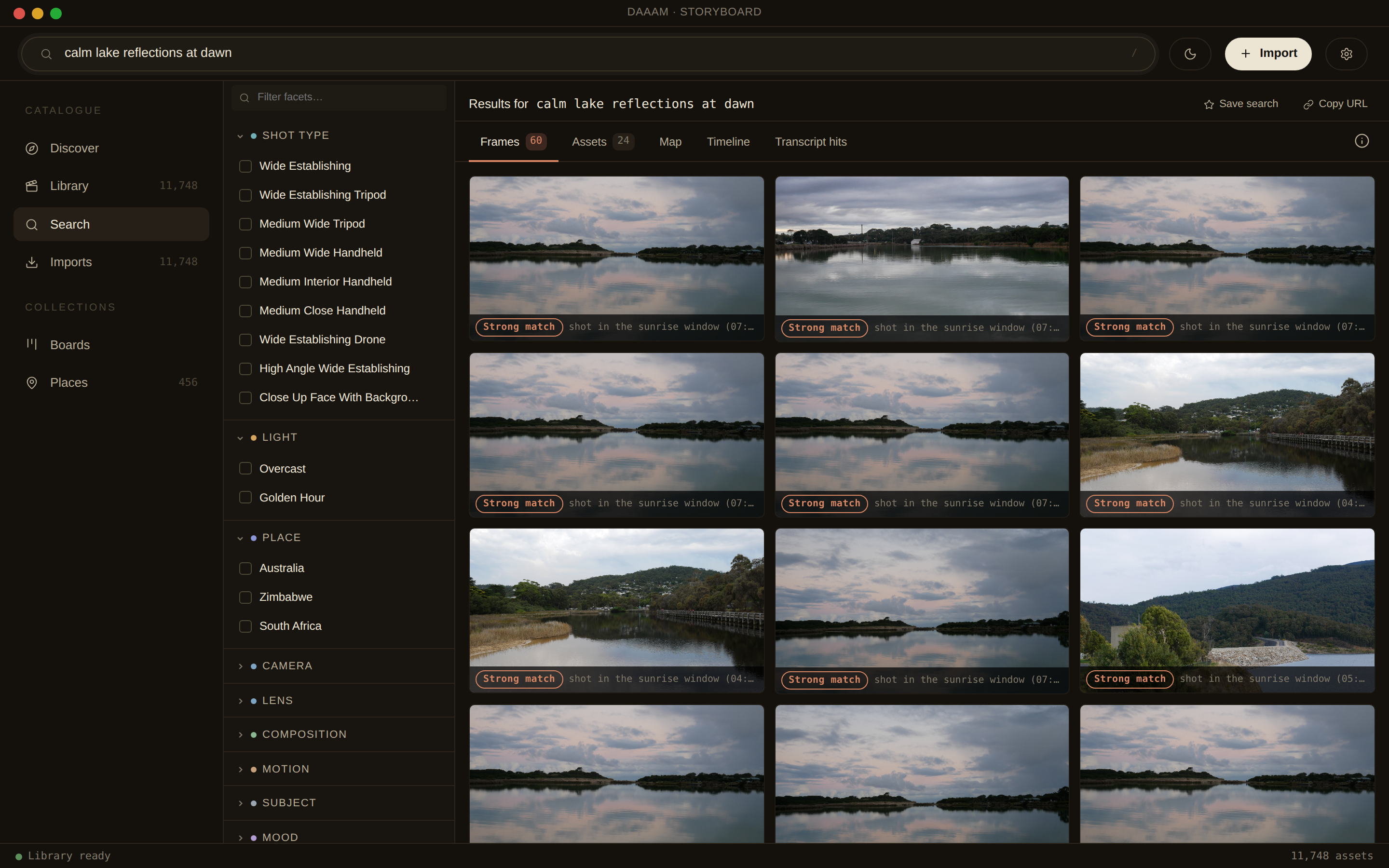
A real capture of DAAAM searching calm lake reflections at dawn against a test catalogue. Results are ranked frames, filterable live by shot, light and place.
Privacy matters
Your personal archive is your most private material. DAAAM processes every image and frame entirely on your Mac. Nothing is uploaded: not the photos, not the captions, not the GPS.